
Stop Clicking, Start Commanding: Why the Firebase CLI is the Secret Backbone of Scalable SaaS
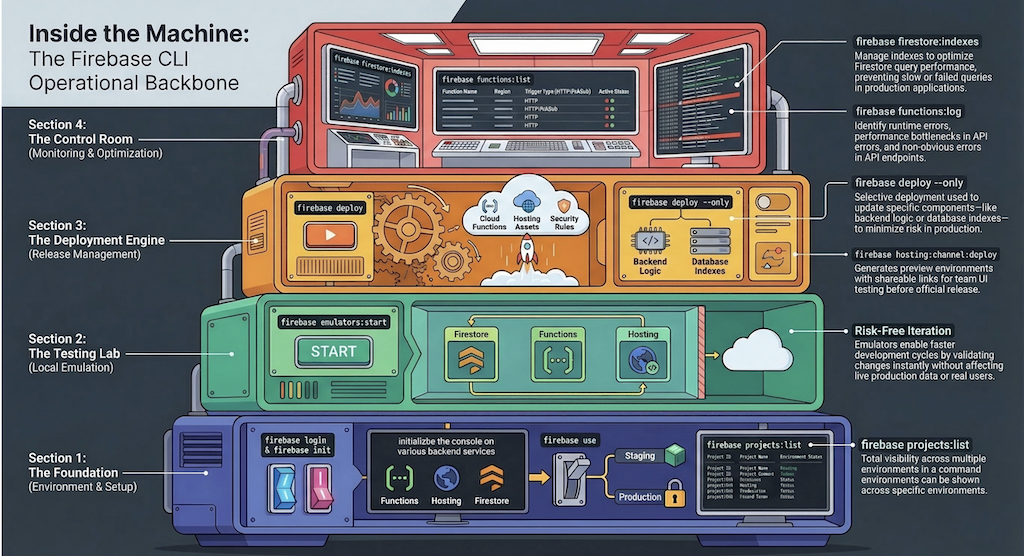
Developers often fall into the trap of white-knuckling their way through complex web consoles to manage backend services. While the Firebase Console is a visual marvel, relying on it for production infrastructure is a recipe for inconsistency and human error. To achieve true operational excellence, elite teams move beyond the "manual console trap" and embrace the Firebase Command Line Interface (CLI). This isn't just about speed; it is about treating your infrastructure as a controlled, automated, and scalable asset. The CLI is the professional’s bridge between simple development and high-stakes SaaS reliability.
The Local "Time Machine": Testing Without Consequences
The idea of running a "cloud" on a local laptop is fundamentally counter-intuitive, yet it is the single greatest catalyst for iteration speed. Through firebase emulators:start, the CLI launches local instances of Firestore, Cloud Functions, and Hosting. This creates a "Time Machine" effect, allowing you to simulate complex architectural changes without the latency of cloud deployments or the risk of corrupting live data. In high-performance environments like SEO Book Pro, where audit engines must process massive streams of data, the ability to test logic locally is a strategic requirement. You can break things, refactor them, and validate the flow between services in seconds rather than minutes.
"The firebase emulators:start command acts as a local monitoring environment. It allows for the safe testing of complex workflows and data flows—such as audit engines—without affecting live production data."
By catching performance bottlenecks and logic flaws in a local sandbox, you ensure that experimental code never compromises the production environment or the end-user experience.
Precision over Bulk: The Power of Selective Deployment
The primary command, firebase deploy, is the backbone of the system, pushing everything from Hosting assets to Firestore rules in one go. However, as a SaaS scales, "bulk" becomes a liability. Senior DevOps practitioners prioritize precision to minimize the "blast radius" of any update. Using the --only flag allows for targeted strikes. If you’ve optimized a specific SEO audit pipeline, you shouldn't risk redeploying your entire hosting stack. Instead, you execute firebase deploy --only functions:auditRunner. This selective deployment is a critical best practice; it ensures stable infrastructure remains untouched while you push isolated bug fixes or API updates. This level of granularity is what separates a fragile "all-or-nothing" deployment strategy from a resilient, professional workflow.
Auditing the Invisible: Real-Time Monitoring and Logic Verification
Operational control is impossible without visibility. While a web dashboard provides a snapshot, the CLI gives you a "real-time pulse" of your system health. When you run firebase functions:list, you aren't just looking at a list of names. You are auditing your architecture directly from the terminal, viewing:
Regions: Ensuring geographic optimization for your users.
Trigger Types: Verifying whether logic is firing via HTTP or Pub/Sub.
Status: Confirming with absolute certainty that the deployment is active and healthy.
For active troubleshooting, firebase functions:log is the standard for real-time debugging. In the context of SEO audit pipelines, where execution failures can result in data gaps, this command allows you to identify runtime errors and performance bottlenecks as they happen. Monitoring isn't just a post-mortem for errors; it is a proactive strategy to maintain post-deployment stability.
The Safety Net: Mastering Environment and Preview Management
Accidental production deployments are the nightmare of every DevOps engineer. The Firebase CLI mitigates this via strict environment management. The firebase use command allows you to toggle between "staging" and "production" contexts, ensuring that your local commands are always directed at the intended project. Furthermore, the CLI enables a modern validation workflow through firebase hosting:channel:deploy. This creates "preview environments" with shareable links, allowing stakeholders to validate UI changes in a live-like setting before they ever touch the main production URL. This safety net allows for rigorous QA and stakeholder approval, ensuring the final push is a non-event.
The Silent Performance Killer: Database Indexing
As datasets grow—particularly the large-scale audit data handled by SEO Book Pro—query performance can degrade into a silent killer of the user experience. Clicking "Add Index" in a UI is insufficient for a professional CI/CD workflow. The CLI allows you to manage firestore.indexes.json as code. By using firebase deploy --only firestore:indexes, you ensure that complex filtering and real-time dashboards remain lightning-fast. Treating indexes as a deployable asset ensures that your database optimization scales alongside your codebase, preventing the performance lag that often plagues data-heavy applications.
From Developer Tools to Operational Controls
The Firebase CLI is the operational backbone of the modern SaaS stack. It facilitates the transition from manual, error-prone actions to a robust model of automation and Infrastructure as Code. By integrating commands like firebase login, firebase init, and firebase projects:list into your CI/CD pipelines, you move beyond the limitations of a developer tool and into the realm of enterprise-grade operational control. From the "time machine" of local emulators to the precision of targeted deployments, these tools provide the necessary guardrails to manage complex cloud infrastructure with total confidence. The shift to a command-driven workflow is the defining characteristic of a professional, scalable infrastructure.
Did you find this helpful?
Share your appreciation with a like.